
In-House IT vs Managed IT Services: A Cost Reality Check
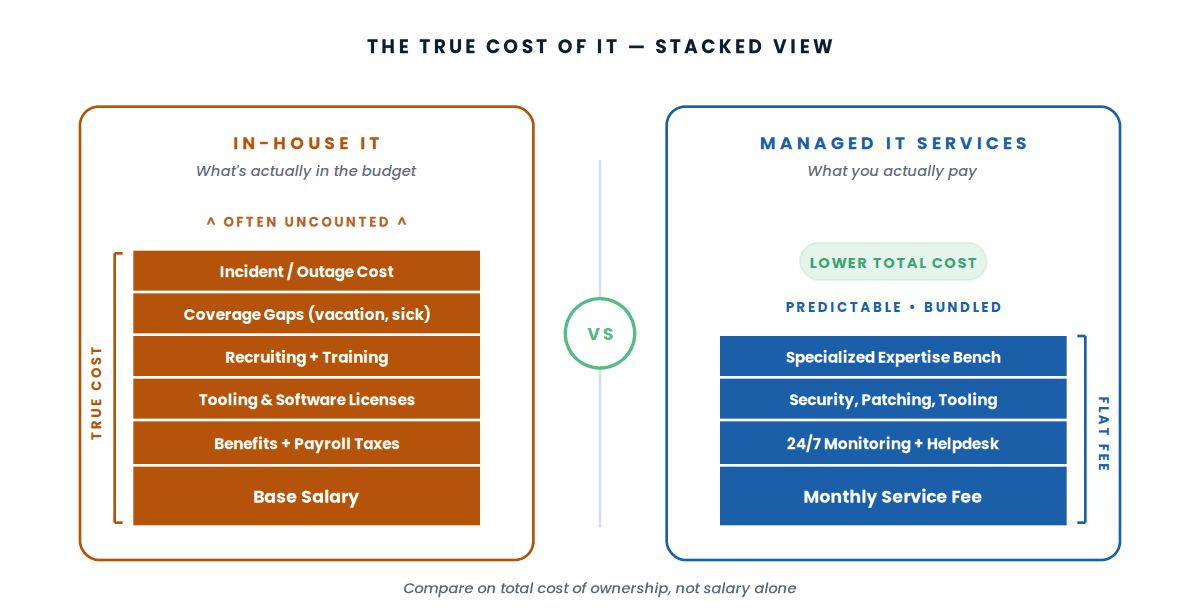
If your organization has been weighing whether to keep building out an in-house IT team or move some — or all — of that work to managed IT services, you're asking the right question at the right time. Mid-market businesses across Southern California are reevaluating this decision more often than they used to, and for good reason: the math has changed.
The conversation usually starts with a single hire. Your one IT person is overwhelmed, and you're being asked to approve a second — or a third. The salary number on its own looks manageable. The total cost, when you include benefits, recruiting, training, software, infrastructure, and the cost of vacancies and turnover, looks very different. Managed IT services starts to look reasonable around the same time.
This article walks through the honest cost comparison between in-house IT and managed IT services, where each model actually fits, the hidden costs both sides usually leave out of their pitch, and a framework for deciding which one fits your organization. Vendor-neutral, no scoring, no rankings — just an honest look at the math and the tradeoffs.
In-house IT wins for organizations large enough to need 4+ full-time IT staff with specialized skills, those with strict regulatory requirements that demand internal control, or those with workloads requiring constant on-site presence. Managed IT services wins for most mid-market organizations under that threshold — the total cost of ownership is typically lower, the capability bench is broader, and the operational risk is more predictable. The honest answer for most growing organizations is a hybrid model — internal IT for strategic and on-site work, managed services for monitoring, after-hours coverage, and specialized expertise.
The two models at a glance
Before getting into the cost math, here's the one-paragraph version of what each model actually is in practice — not how it's pitched.
Direct employment
Full-time staff who report to your organization, sit in your offices, and own your IT operations. They know your business deeply, build long-term institutional knowledge, and respond to issues with the urgency of someone whose job depends on it. Their depth in your environment is a real strength; their breadth across the latest technologies is constrained by what one or two people can keep current on.
Outsourced expertise
A contracted service provider whose team handles defined IT functions on your behalf — monitoring, patching, helpdesk, security, infrastructure management, or some subset. You get access to a broader skill base than you could hire in-house at similar cost, plus 24/7 coverage and tooling that comes with the contract. The tradeoff is less institutional knowledge and a relationship governed by a service agreement rather than employment.
Most organizations actually run a hybrid of both. The interesting question isn't "which one" — it's "which work goes where" and "what's the right ratio at our size."
In-house IT vs managed IT services compared
Here's how the two models stack up across the factors that come up most often in real budgeting conversations. None of these are pass/fail — they're tradeoffs that hit different organizations differently.
| Factor | In-House IT | Managed IT Services |
|---|---|---|
| Cost model | Salary + benefits + overhead, mostly fixed | Predictable monthly fee, scales with usage |
| Coverage hours | Business hours unless on-call rotation built | 24/7 monitoring typically standard |
| Skill breadth | Limited to what your hires know | Bench of specialists across networking, security, cloud, etc. |
| Institutional knowledge | Deep — your people know your business | Shallower; depends on documentation quality |
| Vacancy / turnover risk | Significant — single hire departure creates real exposure | Mitigated by provider's team depth |
| Tooling and software | You buy and maintain monitoring, ticketing, MDM, security tools | Bundled into the service |
| Strategic alignment | Deep — they're inside the business | Variable — depends on the relationship |
| On-site presence | Daily by default | Scheduled visits + remote-first |
| Regulatory / compliance fit | Strong — internal control of all access | Strong with right contracts and certifications |
| Scalability | Slow — hiring takes months | Fast — add services or sites in days |
The five cost categories most in-house IT budgets miss
Comparing in-house IT to managed services on salary alone is the single most common mistake in this analysis. The salary is the most visible cost — but rarely the largest. Five categories of cost typically get left out of in-house comparisons:
Benefits and overhead
An IT staff salary plus benefits, payroll taxes, workers' comp, and standard overhead typically lands at roughly 1.25 to 1.4 times the base salary. Mid-market organizations often miss this — a $90,000 salary becomes an effective $115,000-$125,000 cost. Two engineers at $95,000 each becomes $240,000-$265,000 fully loaded.
Tooling, software, and infrastructure
An in-house team needs monitoring tools, ticketing systems, remote access platforms, MDM, endpoint security, backup software, and patch management. These licenses and subscriptions add up to a meaningful number per year — often $30,000-$80,000 for a mid-market environment. Managed services providers typically include these in their contract.
Recruiting, training, and certifications
IT recruiting in Southern California is competitive. Replacing an engineer who quits often involves recruiter fees (15-25% of first-year salary), several months of vacancy with backfill costs, and onboarding time before the new hire is productive. Ongoing certifications and training to keep skills current add another recurring cost. None of this shows up in a salary comparison.
Coverage gaps
A single in-house IT engineer covers business hours. They take vacation, get sick, attend training, and eventually leave. Coverage gaps mean either accepting reduced response time or paying for backup capacity — typically through after-hours support contracts, on-call rotation premiums, or temporary contractor work. The honest cost of "in-house IT" includes the cost of covering the hours your in-house team isn't actually working.
Cost of incidents and outages
This is the hardest cost to estimate but often the largest. An in-house team without 24/7 monitoring discovers problems when employees report them — typically hours after the issue started. Managed services with proactive monitoring detects problems before users notice. The financial impact of unplanned downtime varies by organization but is rarely zero. For multi-site or revenue-dependent operations, it's often the deciding factor.
None of this means in-house IT is wrong. It means the right comparison isn't "salary vs monthly fee" — it's "fully loaded cost of operating IT internally" vs "managed services contract." When the comparison is honest, the numbers usually tell a clearer story.
Who actually fits each model
In-house IT fits if:
- You have 200+ employees with sufficient ticket volume to justify 3-4 full-time IT staff
- Your industry has regulatory requirements that demand internal control of systems (some defense, some healthcare specialties)
- Your IT environment is unusually specialized and requires deep, persistent product knowledge
- You have continuous on-site needs that make remote-first support impractical
- You can hire and retain talent at competitive rates without significant turnover
Managed IT services fits if:
- You're under 200 employees and can't justify 3+ full-time IT staff
- You operate from multiple sites and need consistent support across all of them
- You need 24/7 monitoring or after-hours coverage but don't have on-call rotation
- Your single IT engineer is overwhelmed and you're considering a second hire
- You want predictable monthly costs rather than volatile salary, recruiting, and tooling expenses
- Your in-house IT person is too valuable for routine work and should be focused on strategic projects
The hybrid model fits if:
- You have one or two strong in-house IT people and want to multiply their effectiveness
- You want internal ownership of strategy and vendor relationships, but external execution on monitoring and routine support
- You operate multi-site and need local presence at HQ but coverage at remote sites
- You want a backstop for vacations, illness, and turnover without paying for redundancy you rarely use
The hybrid model is what most successful mid-market organizations land on, and it's what we see most often across our managed services customer base in Southern California.
What we see in the field
Across hundreds of managed services engagements throughout Southern California — schools, healthcare clinics, multi-site retail, corporate offices, warehouses, and commercial real estate — the pattern is consistent enough to be predictable.
Single-IT-person organizations almost always benefit from adding managed services rather than hiring a second IT person. Managed services costs less than a fully loaded second hire, covers more hours, and provides specialized depth (network engineering, security, cloud) that one or two in-house generalists rarely have.
Multi-site organizations reach the managed services tipping point earlier — typically around 3 sites. The operational complexity of consistent IT support across multiple locations makes managed services attractive long before total headcount would justify a larger in-house team.
Mid-sized enterprises (200-500 employees) typically land on hybrid — keeping internal IT for strategic functions, vendor management, and on-site presence at HQ, while outsourcing monitoring, helpdesk, after-hours coverage, and specialized infrastructure work to managed services.
K-12 districts and SLED organizations often run leaner internal IT than the headcount alone would suggest, because managed services covers gaps that internal hiring constraints (budget, civil service requirements) prevent them from filling otherwise.
None of this is a formula. The right answer depends on the specific organization. But the pattern of mid-market organizations underestimating the true cost of in-house IT — and overestimating their need for full-time internal staff — is consistent enough to be worth questioning whenever you're asked to approve another IT hire.
Frequently asked questions
How much do managed IT services cost?
Managed IT services pricing varies significantly based on the scope of services, number of users and devices, number of sites, hours of coverage, and the complexity of your environment. Typical pricing models include per-user, per-device, or all-inclusive flat-fee arrangements. The right way to budget is to ask a provider to quote your specific scope rather than rely on industry averages — pricing differences across providers reflect real differences in scope and service depth.
Will managed IT services replace my existing IT staff?
Usually not. The most effective managed services arrangements augment internal IT rather than replace it. Internal staff focus on strategic projects, vendor management, business-aligned work, and on-site presence. The managed services provider handles monitoring, after-hours coverage, helpdesk overflow, and specialized expertise. The hybrid model is the most common outcome for mid-market organizations.
What does a typical managed IT services contract include?
Scopes vary, but most contracts include some combination of: 24/7 network and infrastructure monitoring, helpdesk support for end users, patch management and security updates, antivirus and endpoint protection, backup management, vendor coordination, and quarterly business reviews. More comprehensive contracts also include cybersecurity services, cloud management, and project work. The right scope depends on what your organization actually needs and what your internal team is or isn't doing well.
What's the difference between managed IT services and break-fix IT support?
Break-fix support is reactive — you call when something breaks, and you pay for the time spent fixing it. Managed services is proactive — your provider monitors continuously, prevents many issues before they cause outages, and resolves issues remotely the moment they occur. Break-fix is appropriate for very small organizations with minimal technology footprints. Managed services is appropriate for any organization that depends on technology to operate. The pricing models reflect the philosophical difference: break-fix is hourly, managed services is monthly.
How long does it take to transition from in-house IT to managed services?
Onboarding a managed services provider typically involves several weeks of discovery and documentation, followed by phased transition of services. Critical functions like monitoring and ticketing usually transition first. More complex services like cloud management, security operations, and strategic work transition over the following months. A reasonable expectation is full transition within a single quarter. Rushing the transition usually creates service gaps; slowing it down beyond a quarter usually means the project loses momentum.
Is managed IT services more secure than in-house IT?
Neither is inherently more or less secure — security depends on the specific implementation, controls, and discipline of either model. Managed services providers benefit from specialized security tooling, dedicated security analysts, and 24/7 monitoring that smaller in-house teams typically can't match. In-house IT benefits from internal control over access, data residency, and incident response decisions. The most secure mid-market organizations often run a hybrid: internal ownership of security policy and access governance, with managed services handling 24/7 monitoring and incident detection.
Can managed IT services support multi-site organizations?
Yes — multi-site coverage is one of the strongest reasons mid-market organizations move to managed services. Providing consistent IT support across 3, 5, or 50 sites is operationally complex for in-house teams that are usually concentrated at headquarters. Managed services providers with multi-site expertise can deliver consistent monitoring, helpdesk, and on-site dispatch across geographic regions without requiring you to hire and manage staff at each location.
What if our existing IT staff doesn't want to work with a managed services provider?
This is a real concern that should be addressed directly during evaluation. Internal IT teams sometimes view managed services as a threat to their roles, when in practice the opposite is usually true — managed services frees internal IT from routine work and lets them focus on higher-value, more visible projects. The transition is smoother when internal IT is involved in selecting the provider, defining the scope, and designing the operational handoff. Imposing a managed services provider on an unwilling internal team rarely works.
Considering managed IT services for your organization?
WCC provides managed IT services across Southern California — covering monitoring, helpdesk, security, network, and infrastructure for mid-market organizations and multi-site operators. We'll walk your environment, understand your in-house team, and design a scope that augments rather than replaces.
Talk to an Engineer