
Cloud vs On-Prem Access Control: A Decision Framework for Facility Managers
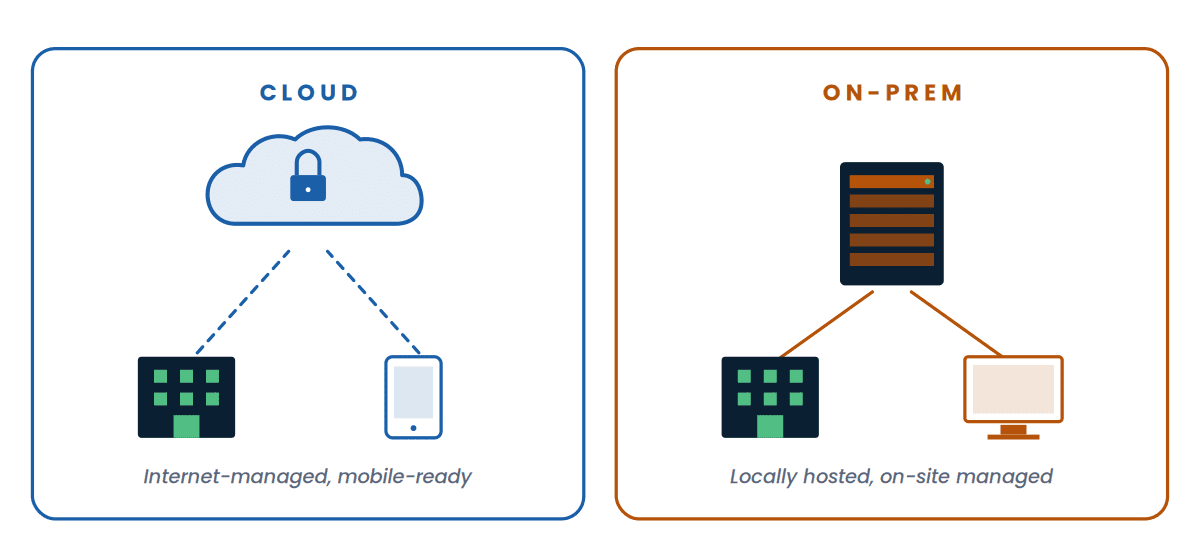
If you're evaluating cloud access control against a traditional on-premise system in 2026, you've probably already noticed something odd: the conversation isn't really about access control anymore. It's about where the brains of the system live — in the cloud, or on a server in your IT closet — and what tradeoffs come with each choice.
That's the question we get asked most often when Southern California facility managers, IT directors, and security teams reach out to us about replacing or expanding access control. And it's the question that doesn't have a universal right answer.
This guide walks through how each architecture actually works, the five decision factors that matter most, and a framework you can use to figure out which fit is right for your organization — without the vendor-pitch language.
Cloud access control wins on speed, scalability, mobile credentials, and reduced IT burden — and it's the right answer for most organizations under 50 doors. On-premise access control still wins for facilities with strict data residency rules, intermittent internet, or specific compliance frameworks that require local data control. The honest answer for most multi-site organizations is a hybrid path — cloud-first for new sites, with a planned migration of legacy on-prem systems over 18-36 months.
Cloud access control vs on-prem at a glance
Before we get into the detail, here's the high-level picture across the eight factors that come up most often in real buying conversations.
| Factor | Cloud | On-Premise |
|---|---|---|
| Cost model | Predictable monthly subscription | Larger upfront capex, smaller annual maintenance |
| Time to deploy | Days to weeks | Weeks to months |
| IT team burden | Minimal — vendor handles patching, backups | Significant — your team owns the server stack |
| Multi-site scalability | Add sites in hours from one console | Each site typically needs its own infrastructure |
| Mobile credentials | Standard, included on most platforms | Often available but more complex to deploy |
| Video integration | Native with cloud video platforms | Requires integration work, sometimes third-party middleware |
| Internet dependency | Required for management, varies for door operation | None for normal operation |
| Hardware lifecycle | Vendor handles end-of-life, firmware | You manage end-of-life, often 7-10 year cycles |
How cloud access control actually works
In a cloud architecture, the management software lives in the vendor's data center — not on a server in your building. Door readers and controllers connect to the local network, then talk to the cloud platform over the internet. Administrators manage everything through a web browser or mobile app.
The key architectural detail: most modern cloud access control platforms still use a local controller at each site that caches credentials. So if the internet goes down, doors keep working — they just can't be managed from the cloud until connectivity returns. This is an important distinction we'll come back to.
Major cloud access control platforms include Verkada, Brivo, Rhombus, and Avigilon Alta. Each handles the cloud-controller relationship slightly differently, but the architectural pattern is consistent.
How on-premise access control works
In an on-premise architecture, the management software runs on a server inside your building. Door controllers connect to that server over your local network. Administration happens on a workstation that has the management software installed, or through a web interface served from your own server.
This architecture is what most large organizations ran on for the last 20 years, and it still has a real place. Examples include Avigilon Unity and a long list of legacy enterprise platforms many organizations still operate.
On-premise still makes sense when the facility has air-gapped or partially-isolated networks, when compliance frameworks demand local data control, or when the organization has standardized on a specific platform and doesn't want to introduce a second one.
Five decision factors when comparing cloud access control to on-prem
Beyond the architecture differences, there are five factors that drive most cloud-vs-on-prem decisions. Walk your organization through each one honestly and the right answer usually surfaces.
Total cost of ownership
Cloud platforms typically use a per-door, per-month subscription model that bundles software, updates, support, and cloud infrastructure. Capex is lower — you're mostly paying for the door hardware and installation. The tradeoff is that costs continue indefinitely.
On-premise has a higher upfront cost — server hardware, software licenses, professional services — but the ongoing cost is just maintenance and eventual hardware refresh. Over a 7-10 year horizon, the math gets closer than most cloud vendors will admit. Over a 3-5 year horizon, cloud almost always wins on cash flow.
Skip the published price comparisons. The real cost depends on door count, integration scope, labor rates, and whether you're greenfield or replacing existing infrastructure. A genuine quote from an integrator who has walked your building is worth more than any online estimator.
Internet dependency and offline behavior
This is the question every IT director should ask before signing anything: what happens when my internet goes down?
Most modern cloud platforms cache credentials locally on the controller, so doors continue to grant and deny access during an outage. What you lose during an outage is administrative control — you can't add users, change permissions, or pull live activity. When the internet returns, the controller syncs back to the cloud.
On-premise systems are not dependent on the internet for any function. They depend on your local network and your local server, both of which are typically more reliable than commodity internet circuits in many SoCal commercial buildings. For facilities with chronically unreliable internet — older industrial sites, remote facilities, parts of the Inland Empire still on DSL — this matters more than vendors usually acknowledge.
Compliance and data residency
Cloud access control vendors store credential data, access logs, and sometimes video footage in their data centers. For most organizations this is fine — vendors typically encrypt at rest, hold relevant security certifications, and have stronger physical security than the average IT closet.
For HIPAA-covered healthcare organizations, the question is whether the vendor signs a Business Associate Agreement and how they handle PHI-adjacent data like access logs that may indicate patient location. Most major cloud platforms support this, but it requires verification and often a specific contract addendum.
For organizations with industry-specific compliance requirements — government, defense, finance — the answer is often that data simply cannot leave the local network, which forces an on-premise architecture regardless of any other factor. The Security Industry Association publishes guidance on physical security standards that's worth reviewing if your facility has specific regulatory exposure.
IT and security team burden
This is where cloud's advantage is the most lopsided. With cloud, the vendor handles software updates, security patches, server maintenance, backups, certificate renewals, and end-of-life hardware roadmaps. Your team manages users and permissions.
With on-premise, your team owns all of the above. The annual hidden cost of running an on-prem access control server — patching, monitoring, backup verification, SSL certificate management, OS upgrades — is significant for a system most IT teams consider a side project rather than core infrastructure.
If your IT team is small, stretched, or doesn't have a dedicated physical security person, cloud removes a category of work that nobody enjoys doing. The NIST Cybersecurity Framework outlines the baseline maintenance and monitoring obligations that come with any networked security system — obligations that don't disappear with on-premise, they just become your team's responsibility.
Multi-site scalability
Cloud architectures scale horizontally without architectural change. Adding a fifth or fiftieth site means installing door hardware and registering it to your existing cloud tenant — there's no new server, no new database, no new IT footprint at the new site.
On-premise platforms typically require either a server at each site (most common) or VPN connectivity back to a central server (more complex, more failure points). For organizations that operate one main facility, this isn't a meaningful difference. For organizations with five or more sites — school districts, retail chains, multi-building campuses, healthcare networks — the operational difference is dramatic.
The hybrid reality: cloud access control with on-prem holdovers
In practice, very few organizations operate in pure cloud or pure on-premise. Most multi-site organizations we work with across Southern California are running a hybrid:
- New facilities and renovations get cloud access control by default
- Legacy on-premise systems continue running at sites where the existing infrastructure has remaining useful life
- A planned migration timeline — usually 18 to 36 months — moves the legacy sites to cloud as their hardware reaches end-of-life
This phased approach avoids two common mistakes: ripping out functional infrastructure to chase a cloud-first mandate, or delaying any cloud adoption until a single big-bang migration that never quite happens. The right strategy is usually cloud at the edges, on-prem in the middle, with a clear retirement plan for the on-prem.
Three buyer profiles — which one is yours?
Choose cloud if…
- You operate fewer than 50 doors across one or a few sites
- Your IT team is small or stretched thin
- You want mobile credentials as a standard feature
- You expect to add sites or doors over the next 3-5 years
- You don't have specific data-residency compliance requirements
- You prefer predictable operating expenses over capital expenses
Choose on-prem if…
- You have specific compliance frameworks requiring local data control
- Your facility runs on air-gapped or isolated networks
- Your internet connectivity is unreliable or intermittent
- You're committed to a long-term capital depreciation strategy
- You have an existing on-prem standard you don't want to mix
- You have a dedicated team that already manages similar systems
Choose hybrid if…
- You operate multiple sites with mixed connectivity quality
- You have legacy on-prem systems with remaining useful life
- You're a school district or multi-campus organization
- You want to migrate gradually, not all at once
- Your sites have different compliance profiles
- You need both standardization and flexibility
What we've seen in the field
Across hundreds of access control deployments throughout Southern California — schools, hospitals, corporate campuses, warehouses, government facilities — the pattern is consistent: the right architecture depends on the organization, not the technology.
K-12 districts with 30+ schools, modest IT staffing, and ongoing E-Rate budgets are usually best served by cloud access control with mobile credentials and centralized management. Healthcare organizations with strict HIPAA workflows often run hybrid — cloud at clinics and admin buildings, on-prem at the main hospital where compliance and integration depth justify the additional infrastructure. Enterprise multi-site operators almost universally trend cloud-first for new sites, with planned migrations of legacy infrastructure on a multi-year timeline.
The mistakes we see most often aren't choosing the wrong architecture — they're choosing without doing the architectural assessment in the first place, then trying to retrofit the system to constraints that should have been considered upfront.
Considering a new access control system?
Our engineers design and install both cloud and on-premise access control across Southern California — Verkada, Brivo, Rhombus, Avigilon Alta, Avigilon Unity, and others. We'll walk your facility, understand your constraints, and recommend the architecture that actually fits your organization.
Talk to an EngineerFrequently asked questions
Is cloud access control safer than on-prem?
Neither architecture is inherently safer — both can be deployed securely or insecurely depending on configuration. Cloud platforms benefit from professional security teams, regular patching, and physical data center security that exceeds most on-site IT closets. On-prem benefits from no internet exposure of management interfaces and full control over data residency. The real security comes from configuration discipline, network segmentation, and credential management — not the deployment model.
Does cloud access control work during an internet outage?
Yes, for normal door operation. Modern cloud access control platforms cache credentials locally on the controller, so existing users continue to be granted or denied access during an outage. What you lose temporarily is the ability to manage the system from the cloud — adding users, changing permissions, viewing live activity. When connectivity returns, the controller syncs back automatically.
How much does access control cost per door?
Honest answer: it varies enormously based on door type, reader specification, integration scope, labor, and whether you're new construction or retrofit. Online estimators rarely match real project costs in Southern California once labor, code requirements, and existing infrastructure are factored in. A walk-through quote from an integrator who has assessed your specific facility is the only number worth budgeting against.
Can I migrate from on-prem to cloud access control?
Yes, and most organizations migrate in phases rather than all at once. Common approaches include replacing controllers door-by-door as part of normal maintenance cycles, migrating one site at a time, or replacing the entire system during a major facility renovation. User and credential databases can usually be exported from on-prem platforms and imported into cloud platforms, though some cleanup is typical. A phased migration over 18-36 months is the most common pattern.
Is cloud access control HIPAA compliant?
Major cloud access control platforms support HIPAA compliance through Business Associate Agreements and appropriate technical safeguards. The platform itself being capable is necessary but not sufficient — your specific deployment configuration, user management practices, and integration with other systems also need to be HIPAA-aligned. Healthcare organizations should verify BAA terms with the vendor and have their compliance team review the deployment architecture.
What happens to my data if my cloud access control vendor goes out of business?
This is a legitimate concern that should be addressed in vendor contracts before signing. Most major cloud access control vendors are well-capitalized and have data export commitments built into their service agreements. The practical risk is lower than it might feel — door hardware will continue to function locally even if cloud management goes offline — but you should always confirm export procedures, data formats, and contractual continuity provisions during vendor evaluation.
Does cloud access control require an annual service contract?
Cloud access control is sold as an ongoing subscription rather than a one-time purchase, so the subscription itself is the contract. Most platforms offer monthly, annual, or multi-year terms with corresponding price adjustments. There's typically no separate maintenance contract because software updates, support, and infrastructure are bundled into the subscription. On-premise platforms are different — they typically require a separate annual maintenance contract on top of the original software purchase.
Can cloud and on-prem access control work together?
In practice, most multi-site organizations run both architectures simultaneously rather than truly integrating them. A typical pattern is on-prem at the main facility with cloud at branch locations, with each system managing its own doors. Some platforms offer federation features that allow shared credential management across sites, but full architectural integration between cloud and on-prem from different vendors is rare and usually not worth the complexity. The pragmatic approach is to run them in parallel during a multi-year migration to a single architecture.