
Migrating from Legacy to Cloud Access Control: A Practical Planning Guide
You've decided to move from legacy on-prem access control to a cloud platform. The architectural decision is made and the platform is chosen — now comes the part that makes most IT and security teams quietly anxious: actually doing the migration without breaking what's working.
The good news: a well-planned cloud access control migration is rarely the disaster organizations fear. The bad news: poorly planned migrations almost always run over budget, frustrate end users, and leave gaps in security coverage during the transition. The difference between the two outcomes comes down to phasing, sequencing, and avoiding a few specific mistakes that we've seen play out across hundreds of installations.
This guide walks through the four phases of a cloud access control migration, the five mistakes that derail projects, and the planning decisions that should be made before the first piece of hardware arrives.
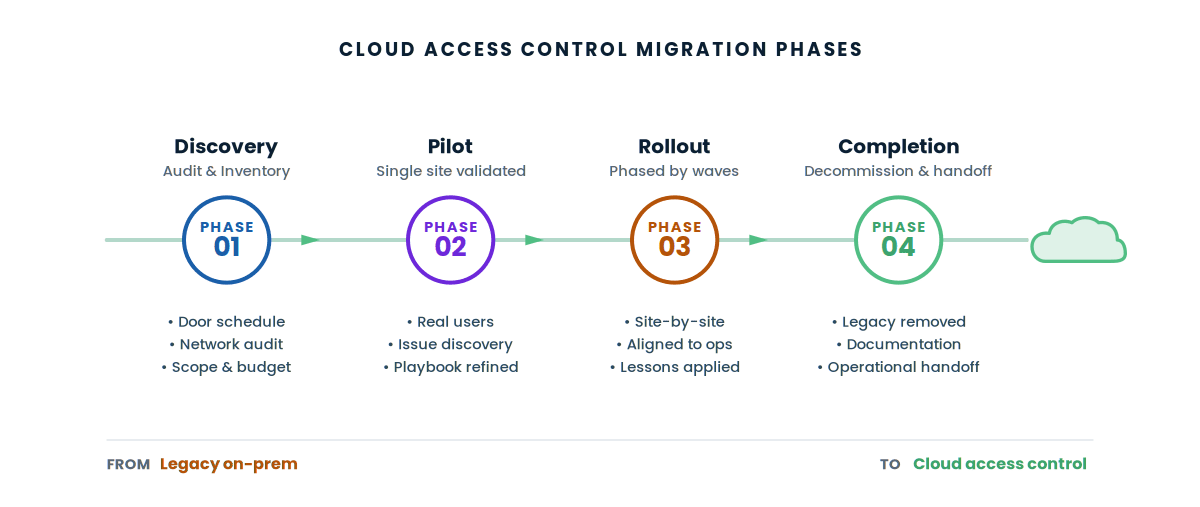
Successful cloud access control migrations follow four phases: discovery (audit existing infrastructure and define scope), pilot (one site or one wing, fully migrated and validated), rollout waves (phased site-by-site replacement aligned to operational windows), and completion (legacy decommissioning, documentation, and handoff). The biggest mistakes are skipping the pilot, trying to migrate everything at once, and failing to plan for credential cutover.
Why organizations migrate to cloud access control
Before getting into the how, it's worth being honest about the why. Most legacy access control systems didn't break — they aged out. The hardware still works. The software still functions. But the gap between what legacy can do and what modern cloud platforms offer has grown wide enough that the operational cost of staying on legacy now exceeds the cost of migrating off it.
The most common drivers we see for migration:
- End-of-support hardware — controllers from the early 2010s and earlier are reaching manufacturer end-of-life, with no replacement parts available
- Mobile credential demand — staff and visitors expect to use their phones; legacy systems often can't deliver this without a forklift upgrade
- Multi-site operational pain — managing legacy access control across 10+ sites means 10+ servers, 10+ patching schedules, 10+ backup processes
- IT team burden — the time spent maintaining legacy infrastructure is time not spent on higher-value work
- Integration limitations — modern identity systems (Azure AD, Okta) and HR systems integrate cleanly with cloud platforms; legacy access control rarely does
- Risk of failure during a transition window — older controllers that haven't been touched in years sometimes don't survive a power cycle, forcing emergency replacement on a bad day rather than planned replacement on a good one
If any of these are true for your organization, you're already paying a tax on legacy access control. The migration question becomes when, not if.
The four phases of a cloud access control migration
Every successful cloud access control migration we've installed across Southern California follows the same four phases. The names vary, the documents vary, but the structure is consistent.
Discovery and inventory
Before any hardware decisions get made, your integrator should do a full inventory of the existing system. This is the phase where careful work pays the largest dividends — and where most organizations move too fast.
What discovery should produce:
- Complete door schedule with door type, lock hardware, reader type, and existing wiring
- Controller inventory by model, age, and end-of-life status
- Credential database export with active user count and access groups
- Existing integrations (HR systems, identity providers, video systems, alarm systems)
- Network infrastructure assessment — PoE availability, VLAN segmentation, internet capacity
- Operational constraints — which doors are mission-critical, which can tolerate downtime, which require 24/7 access
Discovery is also the phase where scope decisions happen. Will every door migrate at once, or will some stay on legacy? Will existing readers be reused or replaced? Will the cloud platform integrate with your identity provider on day one or in a follow-up project? These decisions shape everything downstream.
Pilot deployment
The pilot is a single site, single building, or single wing — fully migrated to the new cloud platform, fully validated, and operated long enough to prove the design before you scale it. We can't overstate how important this phase is. Skipping it is the most common cause of migration disasters.
What a good pilot includes:
- Real users with real credentials, not just test cards
- A full week (minimum) of normal operation under real conditions
- Documentation of every issue encountered — even small ones
- End-user feedback on the experience (mobile credentials, response time, confusion points)
- Refinement of the integration playbook before it's repeated 30 more times
A successful pilot is one where you found and solved problems before they affected the broader rollout. A failed pilot is one where everything appeared to work, and you discovered the real issues during full deployment.
Rollout waves
With the pilot validated, the rollout proceeds in waves — multiple sites or zones migrated in parallel, with each wave benefiting from the lessons of the previous one.
Wave-based rollout has several advantages over a single big-bang approach:
- Operational disruption is contained to specific sites at specific times
- The integrator team becomes more efficient with each wave as patterns are recognized
- Issues discovered in one wave can be corrected before they're repeated across remaining sites
- Budget can be staged across fiscal years if needed without leaving the project incomplete
- End-user training and communication can be tailored to each site as it comes online
Wave size depends on integrator capacity, your team's ability to absorb training and change, and operational windows. School districts often align waves to summer and winter breaks. Healthcare facilities work around scheduled clinical downtime. Multi-tenant commercial buildings coordinate with tenant communications.
Completion and decommissioning
The migration isn't over when the last door is converted. Several things need to happen to formally close the project:
- Legacy controllers physically removed and either disposed of or repurposed
- Legacy software licenses cancelled (this is often overlooked — organizations continue paying for software they no longer use)
- Final user audit — confirm every credential in the new system maps to a current employee or authorized user
- Documentation handoff — door schedule, network diagrams, admin user list, vendor contacts
- Operational handoff to your IT or facilities team, including escalation procedures
- Post-migration review — what worked, what didn't, what the team learned for the next time
The decommissioning phase is also where lingering data residency questions get resolved. Old credential databases, access logs, and historical reports often live on legacy servers for years after the system has been replaced. Decide upfront what data needs to be retained, what needs to be exported, and what can be destroyed.
Three migration approaches compared
Within the four-phase framework, organizations choose between three migration patterns based on their constraints. Each has tradeoffs.
| Approach | How it works | Best fit | Tradeoff |
|---|---|---|---|
| Site-by-site | One full site migrated at a time, complete before moving to next | Multi-site organizations with strong operational windows | Total project span is longer; mixed environment exists during transition |
| Door-by-door | Within a single building, doors converted incrementally | Single-building or campus where downtime per door must be minimized | Two systems running in parallel for the duration; more complex management |
| Big-bang cutover | Entire system replaced in a single planned outage window | Small facilities with tolerance for a planned weekend outage | High-risk if anything goes wrong; almost never appropriate above 50 doors |
For most organizations of any meaningful size, site-by-site is the default and door-by-door is the variation when staying within a single facility. Big-bang cutover should be approached with extreme caution above 50 doors and is generally only appropriate for very small deployments.
Five mistakes that derail cloud access control migrations
The four phases are the blueprint. Here are the failures we see most often when organizations skip steps or take shortcuts.
Skipping the pilot
The single most common mistake. Pressure from leadership to "just get started" pushes teams to skip pilot deployment and roll directly to multi-site rollout. The result is that issues which should have been found and solved at one site get discovered at fifteen sites simultaneously, with frustrated end users and an integrator team scrambling to fix the same problem in fifteen places. The pilot phase saves more time than it costs.
Ignoring credential cutover planning
The technical migration focuses on hardware. The human migration focuses on credentials. When the new system goes live, every employee needs a working credential — and the legacy credentials need to be deactivated on a precise schedule. Organizations that don't plan this carefully end up with employees locked out, contractors with valid credentials in two systems, or worse, terminated employees whose access was never revoked from the legacy system. Treat credential cutover as its own work stream.
Assuming network infrastructure is ready
Cloud access control needs reliable network connectivity at every door — adequate PoE budget on the switch, properly segmented VLANs, sufficient internet bandwidth, and reliable DNS. Legacy systems often used proprietary cabling or low-bandwidth network connections that won't support the new platform. Discovering this on installation day is expensive. Auditing the network during discovery is cheap.
Underestimating change management
The technical migration is half the project. The other half is communication, training, and end-user experience. Mobile credential rollouts require employees to install an app, complete enrollment, and sometimes change long-standing habits. Visitor management workflows change. After-hours access procedures change. Training and communication that get rushed produce frustrated users who blame the new system, even when the system is working perfectly.
Failing to plan for the hybrid period
During a phased migration, your organization runs two access control systems simultaneously — sometimes for a long time. This creates real operational complexity that needs explicit planning. Which system controls which doors? How do administrators know? What happens when an employee needs access to both legacy and new sites? These questions don't answer themselves; they need a documented playbook before the first wave starts.
Key decisions to make before you start
Six decisions should be settled before any hardware ships. Getting these right upfront prevents most of the problems above.
- Will existing readers and door hardware be reused, or replaced? This drives both cost and timeline. Brivo and Rhombus are typically more accommodating of existing hardware than Verkada.
- Will the cloud platform integrate with your identity provider (Azure AD, Okta, etc.) on day one? Day-one integration adds complexity but prevents a second project later. Phase-two integration is simpler but means parallel user management for a period.
- Who owns the new system after handoff? IT? Facilities? Security? The answer affects training, escalation procedures, and ongoing administration.
- What is the rollback plan? If a wave fails, can the affected doors revert to legacy? This is rarely needed but should be documented, not improvised.
- How will historical access data be retained? Some organizations need years of access log history for compliance. Decide upfront whether to migrate historical data, archive it, or destroy it.
- What does end-user communication look like? Site-by-site migrations need site-by-site communication. The communication plan should exist before the first site is touched.
What we've seen across migrations
The pattern is consistent enough to be predictable.
The organizations that finish on time and on budget almost always invested heavily in discovery, ran a real pilot, and had a designated project owner with authority to make decisions. They didn't have fewer problems — they just had a process to handle problems as they came up.
The organizations that struggled typically rushed discovery, skipped or compressed the pilot, and tried to handle migration as a side responsibility for IT staff who already had full plates. The technical work was always recoverable; the organizational momentum and trust were harder to rebuild after problems mounted.
None of this is unique to access control. It's the same pattern as any infrastructure migration. What makes access control specific is that the stakes are visible — when access control fails, employees notice immediately and complain loudly. There's nowhere to hide a bad migration.
Frequently asked questions
How long does a cloud access control migration take?
The timeline depends on door count, site count, integration scope, and operational windows. A single building of 20-30 doors moves faster than a multi-site district. The right way to plan timing is to think in phases — discovery, pilot, rollout waves, completion — rather than committing to a calendar date that may not survive contact with reality. An integrator who has walked your facility can give you a much more accurate timeline than any general estimate.
Can I keep my existing card readers and door hardware?
Sometimes. It depends on the cloud platform and the age and type of existing hardware. Brivo and Rhombus generally support a wider range of existing access control hardware than Verkada. Standard wiring is often reusable even when readers and controllers are not. The discovery phase is where this gets answered for your specific facility — assumptions made before the walk-through often turn out to be wrong in either direction.
What happens to existing credentials during migration?
Credentials are typically migrated in coordination with the door hardware migration. Existing physical cards may be re-encoded for the new system, replaced entirely, or supplemented with mobile credentials. The user database from the legacy system can usually be exported and imported into the cloud platform, with cleanup expected. The credential cutover process should be planned as carefully as the hardware migration — locked-out employees create urgent operational problems.
Do we need to migrate every door at once?
No, and most organizations don't. Phased migration — site-by-site or door-by-door — is the standard approach. During the migration period, two systems run in parallel, with each door controlled by exactly one system at any time. This requires clear documentation but avoids the risk of a single big-bang cutover affecting an entire organization.
What if our internet goes down during migration?
Cloud access control platforms are designed for offline resilience — modern systems cache credentials locally on the controller, so doors continue to grant or deny access during internet outages. What's lost during an outage is administrative access to the cloud platform, not door operation. During migration, internet reliability should be assessed during discovery, and any sites with chronic connectivity issues should be flagged for additional testing during the pilot phase.
How do we minimize disruption to employees during the migration?
Three things matter most: (1) clear communication before each wave so employees know what's coming and when, (2) good training on mobile credentials and any new procedures, and (3) responsive issue resolution during the first days after each site goes live. Most disruption comes from confusion rather than technical problems — employees who don't know how to use the new system create help desk tickets, even when the system is working correctly.
Can we run the legacy system as a backup during migration?
Generally no, at least not for the same doors. Once a door is migrated to cloud, the legacy controller for that door should be removed or disabled. Running both systems on the same door creates conflicts and is rarely worth the operational complexity. Where legacy can run as a backup is for doors that haven't been migrated yet — the legacy system continues to control those doors normally until their wave arrives.
What is the most common mistake organizations make?
Skipping or compressing the pilot phase. Leadership pressure to "just get started" pushes teams to roll directly from discovery to full deployment without a real pilot. The result is that problems which should have been discovered and resolved at one site get discovered at many sites at once, frustrating end users and overwhelming the integrator team. The pilot saves more time than it costs, even when it feels like a delay.
Planning a cloud access control migration?
WCC has migrated hundreds of organizations across Southern California from legacy access control to cloud platforms — schools, healthcare, enterprise, and commercial real estate. We'll help you scope the migration, run the pilot, and execute the rollout with minimal disruption.
Talk to an Engineer